

Car Alert System No App: How App-Free Driver Alerts Work
A car alert system no app can help a driver hear from a helpful passerby, but it won’t sound an alarm or track a vehicle. If you’d rather not download another app or leave your phone number on a windshield, that distinction matters. A QR code can make contact easier while keeping personal details private.
With a Curb Samaritan Driver Sticker, someone who notices an issue can scan the QR code with a mobile device and send an anonymous text message to the driver. Neither person’s personal information is shared unless the owner chooses to share it. No app download is needed for the person scanning.
This guide explains what app-free car alerts can and can’t do, how QR messaging works, and when it may be a practical contact option. You’ll also see how it differs from an alarm, tracker, or monitoring service, so you can choose an approach that fits the situation. Each Driver Sticker set includes two Driver Connect stickers and a full-service subscription for the usable life of the product, with no recurring fees or upsell.
Key Takeaways
- A car alert system no app can connect a passerby with a driver, but it doesn’t detect vehicle events or replace an alarm.
- Know the QR contact sequence: someone notices the sticker, scans it with a mobile device, and sends a message for the driver to receive.
- Compare alert options by who starts contact, whether they detect an event, app use, and how they handle privacy.
- Choose a visible, suitable spot on vehicle glass or a bumper so someone can notice the Driver Sticker.
- Match the option to your need: QR messaging is for person-initiated contact, not car monitoring.
What Does a Car Alert System Without an App Actually Do?
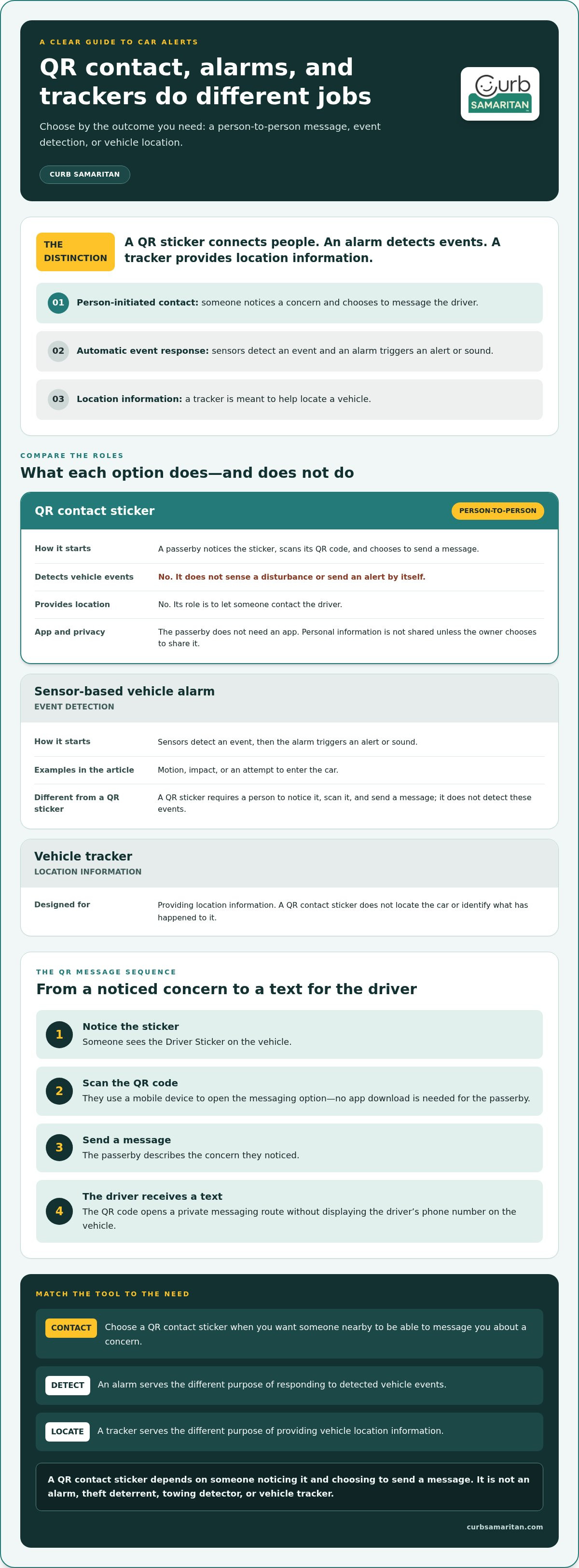
A car alert system no app can mean a way for another person to contact a driver, not a device that detects trouble. A QR contact sticker gives a passerby a way to send a message when they notice something worth sharing. The person starts the alert by scanning the code; the sticker itself doesn’t sense what’s happening around the vehicle.
In short: An app-free car contact sticker lets a person who notices a vehicle concern message its driver, but it doesn’t automatically detect or report vehicle events.
That’s the useful distinction. The QR code connects people, while an alarm or tracking system serves a different purpose. A QR code can be read by a mobile device to start contact. For background on the technology, Wikipedia’s overview of Quick Response (QR) codes explains how these codes store information that a device can read.
An app-free alert is not always an automatic alarm
Some vehicle alarms use sensors to detect events such as motion, impact, or an attempt to enter the car, then trigger an alert or sound. A QR sticker works differently: a person must notice it, scan it, and choose to send a message. Without that human action, the sticker doesn’t detect a disturbance or generate an alert on its own.
That means a Driver Sticker shouldn’t be treated as a theft deterrent, towing detector, or substitute for an alarm. Its role is narrower and more personal: it gives someone who spots a concern a way to reach the driver. Whether anyone notices the sticker and sends a message depends on the situation.
What people mean when they search for car alerts
“Car alert” can describe several different needs. Someone worried about unauthorized entry may mean a theft alarm. Someone trying to locate a vehicle may mean a tracking system. A driver who wants a stranger to report a concern may simply need a contact method.
Those needs aren’t interchangeable. A tracker is meant to provide location information; a sensor-based alarm responds to detected events. A QR contact sticker gives a passerby a way to initiate a message, such as letting a driver know their car is blocking a driveway or that they’ve noticed another issue. It doesn’t locate the car or identify what has happened.
For example, a person who sees a vehicle concern can scan the Driver Sticker with a mobile device and send a private message without downloading an app. The driver’s personal information isn’t shared unless they choose to share it. This can be helpful when the goal is direct, person-initiated contact, but it can’t replace tools designed to detect events or provide a vehicle’s location.
Before choosing an alert option, name the outcome you need: automatic detection, location information, or a way for someone nearby to contact you. Once that’s clear, it’s easier to choose a system that fits without expecting one tool to do every job.
How a No-App QR Car Alert Connects a Driver and a Passerby
The process makes it possible to send a helpful message without asking a stranger to find the driver’s phone number. A passerby scans the QR code on the Driver Sticker with a mobile device, then sends a message through the contact option it opens. The message reaches the driver by text. No app download is needed for the person scanning.
A QR scan opens a private messaging route, letting a passerby send a text alert to the driver without needing their phone number.
Here’s the sequence:
- Notice the sticker. A person sees the Driver Sticker on the vehicle.
- Scan the QR code. They use a mobile device to open the messaging option.
- Send a message. They can describe the concern they noticed.
- Receive contact. The message reaches the driver’s phone by text.
This is a person-to-person contact path, not an automatic vehicle alert. A scan starts the interaction; the sticker doesn’t sense a problem or message the driver by itself. Someone needs to notice the sticker and choose to reach out.
What happens when someone scans the Driver Sticker?
Scanning opens a private messaging route to the vehicle owner. The passerby can send an alert without first getting the owner’s phone number, writing it down, or leaving their own contact details on the car. For instance, they might explain the concern and identify the vehicle so the driver understands which car the message is about. The QR code provides the starting point; the person supplies the message.
The driver receives contact through the messaging platform, while the passerby doesn’t need a separate app to send a message. This can make a quick, considerate heads-up simpler. Still, a scan and message depend on a person taking action. The system can’t ensure that someone will notice the sticker or send an alert.
How app-free messaging protects personal information
The messaging process is designed to keep personal details private. The owner’s personal information isn’t shared with the passerby unless the owner chooses to share it. That gives the driver a way to receive a message without displaying a personal phone number on the vehicle. The service provides private, anonymous messaging without requiring the driver to share personal details.
A car alert system no app can therefore offer a practical middle ground: let a passerby make contact while keeping personal information private. For more detail about privacy and how QR contact stickers work, see this no-app QR code contact sticker guide.
This kind of contact doesn’t replace broader vehicle-safety measures. The NHTSA vehicle safety and theft prevention guidelines offer separate guidance on prevention. A Driver Sticker serves a different purpose: it gives a person who notices a vehicle concern a way to reach its owner. If that kind of private contact fits your needs, explore the Driver Sticker option.
QR Car Alerts vs. Alarm Apps: Choose by the Alert You Need
Both a QR contact sticker and an alarm app can be called a car alert, but they answer different needs. One lets a person reach a driver. The other may use connected sensors to report vehicle events through an app. Choose based on whether you need a human message or automatic detection, not just on whether the option uses a phone.
| What to compare | QR Driver Sticker | Connected alarm app example |
|---|---|---|
| Event detection | Doesn’t detect vehicle events. A person must notice the sticker and scan it. | Smart security devices describe sensor-triggered vehicle notifications. |
| Who starts contact? | A passerby chooses to send a message to the driver. | The connected system can send notifications in response to detected events. |
| App use | The passerby can scan and message without downloading an app. | The connected model uses a mobile app. |
| Privacy | The owner’s personal information isn’t shared unless they choose to share it. | Privacy details vary by product and aren’t described by the example’s listed features. |
The comparison is about function, not which option is universally better. A Driver Sticker provides contact access, not an alarm, tracker, or monitoring service. It can complement a separate vehicle-security setup, but it can’t replace a system designed to detect events. Likewise, a connected alarm app isn’t necessarily a way for a stranger to privately message the driver.
When an automatic alarm or monitoring system fits
If you want sensor-based detection or notifications tied to vehicle events, look at that category separately. For example, Curb Samaritan discusses connected models with sensors, a siren, lights, notifications, and app access. Those details illustrate an app-based approach, not a promise about every alarm or a claim that it prevents theft. Consider what kind of event you want detected and how you want to receive its alert.
Don’t expect a QR contact sticker to detect an impact or unauthorized entry. It waits for a person to notice the sticker and make contact. That difference matters if you need an alert without anyone nearby taking action.
When an anonymous driver message fits
A Driver Sticker can fit when you want someone to have a way to contact you about a concern they notice, but you’d rather not put your phone number on display. A passerby can send a message through the sticker’s QR contact route; your personal details remain private unless you choose to share them. It’s a person-initiated heads-up, not automatic protection.
For instance, a passerby who notices a car-related concern can use the sticker to reach the driver rather than leave a handwritten note with personal contact details. That gives the owner a private way to receive a message, while keeping the limits clear: someone must see the sticker and choose to scan it. For more context on this approach, explore the anonymous car sticker guide.
Think of a car alert system no app as a useful fit when the desired alert comes from another person. If you need automatic event detection, compare alarm or monitoring options on that basis. If you want person-to-person contact without displaying your number, QR messaging serves a different, complementary role.
Where to Place a Driver Sticker and What Situations It Can Support
A Driver Sticker works as a visible invitation to make contact. Place it on vehicle glass or a bumper, choosing a suitable surface where a passerby can notice the QR code. The aim is to make the contact option easy to find without assuming that every person nearby will see it or choose to use it.
Think about the view someone has as they approach or pass the vehicle. A sticker that’s hidden from sight or difficult to make out may be less useful as a contact point. Keep the QR code visible, and choose a spot that makes sense for your vehicle. The Driver Sticker is designed for placement on glass or a bumper.
Make the QR code easy for a passerby to notice
The Driver Sticker set includes two Driver Connect stickers. Consider which of the intended surfaces, vehicle glass or a bumper, gives the code a clear, visible place on your car. The QR code is the entry point to messaging, so visibility matters. Still, placement can’t guarantee a scan or a message.
Use a simple check: stand where someone might reasonably see the vehicle and consider whether the sticker is apparent rather than tucked out of view. Keep the choice practical and don’t assume the sticker will work as a sensor. It doesn’t read the vehicle’s condition, confirm a concern, or alert you without a passerby’s action.
Set realistic expectations for everyday vehicle alerts
A sticker can support a human heads-up if someone notices it and chooses to scan. For example, a passerby might see that a car is blocking a driveway and want to contact its driver. The message depends on that person taking action; the sticker doesn’t automatically detect a blocked driveway, towing, vandalism, or another event.
That distinction helps you decide whether a car alert system no app fits your purpose. It offers a route for a person to report what they’ve noticed, not a way to verify what happened or monitor the car. A message may not arrive, and a QR contact option can’t promise that someone will scan it or that a concern will be resolved.
Use it for what it’s designed to do: make private, person-initiated driver contact possible when someone nearby wants to share a concern. For automatic detection, you’d be looking for a different kind of system. Keeping those roles separate helps you set sensible expectations and choose a contact method that suits your situation.
If you’d like to give passersby a private way to reach you about your vehicle, explore the Driver Sticker.
A Simple App-Free Way to Let People Contact You About Your Car
A QR contact sticker offers a simple kind of car alert: it helps connect a driver with someone who notices a concern. It doesn’t watch the vehicle, detect an event, or send a message on its own. A passerby chooses to scan and make contact, so this option suits drivers who want a person-initiated message without displaying a personal phone number.
The Curb Samaritan Driver Sticker is made for that purpose. Its QR-powered messaging lets a passerby contact the driver without downloading an app. The message is anonymous, and the owner’s personal information isn’t shared unless they choose to share it. That’s a different job from an alarm system, which is the category to consider if you want automatic event detection.
What comes with the Curb Samaritan Driver Sticker
The Driver Sticker set includes two Driver Connect stickers and costs $14.95. It includes a full-service subscription for the usable life of the product, with no recurring fees or upsell. A passerby can scan with a mobile device and send an anonymous message to the driver by text. The sticker provides a private contact route; it doesn’t track the car or monitor its surroundings.
Decide whether app-free driver messaging fits your needs
Think about who you want to start the alert. If you want someone who notices a vehicle concern to have a way to contact you, a QR sticker may fit. If you want a system to detect vehicle events automatically, evaluate alarm systems as a separate category. The right choice depends on the alert you need, and there’s no need to expect one option to do both jobs.
A car alert system no app is most useful when your priority is making contact easy for a passerby while keeping your personal details private. It can offer a practical way for someone nearby to send a heads-up, but a message depends on that person noticing the sticker and choosing to scan it. It can’t promise an alert will be sent or that a concern will be resolved.
Before choosing, consider the difference between a human message and an automatic alert. A Driver Sticker supports the first. An alarm system may suit the second. Keeping that distinction in mind helps you set realistic expectations and choose an option that matches your needs.
If a private, person-initiated way to hear from someone about your car sounds useful, you can explore the Driver Sticker and how it supports app-free contact.
Choose the Kind of Contact That Fits Your Car
Before choosing a car alert system no app, picture the moment you want to make easier. Do you want a nearby person to have a way to reach you, or do you need a system designed to detect vehicle events? Those are different goals, and being clear about yours helps you choose without expecting one tool to do everything.
If person-to-driver contact is what you’re looking for, consider how a visible QR contact option could fit into your everyday parking routine. It offers a simple way for people to share a concern while keeping the choice to respond in your hands. If automatic detection is your priority, explore that category separately.
The right choice is the one that matches your needs and feels comfortable to use. For a private way to invite a helpful message from someone who notices your car, explore the Curb Samaritan Driver Sticker. A small opening for considerate contact can make it easier for people to help one another.
Frequently Asked Questions
Can a car alert system work without an app?
Yes, a car alert system no app can let a passerby use a QR sticker to send the owner an anonymous text. The person must initiate the message by noticing and scanning the sticker; it isn’t automatic event detection. The scanner doesn’t need to download an app. Someone who sees a car concern can choose to message the driver, but the sticker can’t ensure anyone will see or scan it.
Does a QR car sticker track my vehicle?
No. Curb Samaritan’s Driver Sticker is a messaging contact option, not GPS tracking. A passerby must notice the sticker and scan it to send a message. It doesn’t show you where your vehicle is or send automatic movement alerts. If you need location information or vehicle tracking, consider that as a separate product category and choose an option designed for that purpose.
Can someone alert me if my car is blocking a driveway?
Yes, someone who notices your car blocking a driveway may scan its Driver Sticker and send you an anonymous message. They don’t need your phone number to use the contact route. The message still depends on a person seeing the sticker and choosing to scan the QR code. The sticker itself won’t detect that the car is blocking access or send an alert automatically.
Do people need my phone number to send me a car alert?
No. Someone can use the QR-powered messaging service to contact you without being given your phone number. The service doesn’t share personal information between users unless you choose to share it. For example, you can receive a message about a vehicle concern without displaying your number on a note or sticker. You decide whether to share any personal details in a reply.
Will a QR car alert work if nobody scans the sticker?
No. The contact process begins when someone notices the sticker and scans its QR code. Without a scan, the sticker won’t detect a vehicle event or send an automatic message. That’s different from a sensor-based alarm, which is designed to respond to detected events. A QR sticker offers another person a way to reach you, but it can’t guarantee anyone will notice or act.
Does the Driver Sticker require a monthly subscription?
No. The Driver Sticker includes a full-service subscription for the usable life of the product, with no recurring subscription fees or upsell. There isn’t a set expiration period for that access. This lets you use the sticker’s messaging feature without adding a monthly subscription to your routine. The access is included with the product rather than charged as a separate recurring service.
Can I use a car sticker instead of a car alarm?
No, they serve different purposes. A sensor-based alarm is intended to detect vehicle events, while a QR Driver Sticker gives a person a way to contact you after noticing an issue. The sticker isn’t a substitute for an alarm or monitoring service. Choose based on the kind of alert you want: automatic detection, or a message started by someone who sees your vehicle.